Hive 配置 MySQL 作为 metastore

为什么要使用 MySQL 来存储元数据

Hive 默认使用内嵌的 Derby 数据库存储元数据。Derby 只支持一个会话连接,而且元数据存储路径取决于执行 hive 的当前路径,只适合用来做测试,不适用于生产环境。

使用 MySQL 可以支持多个会话同时连接,可以在多个服务实例中共享元数据。

在 Ubuntu 20.04 中安装 MySQL

Step 1:添加 APT 仓库

1
2
wget https://dev.mysql.com/get/mysql-apt-config_0.8.12-1_all.deb
dpkg -i mysql-apt-config_0.8.12-1_all.deb

在提示选项中选择“ubuntu bionic”。

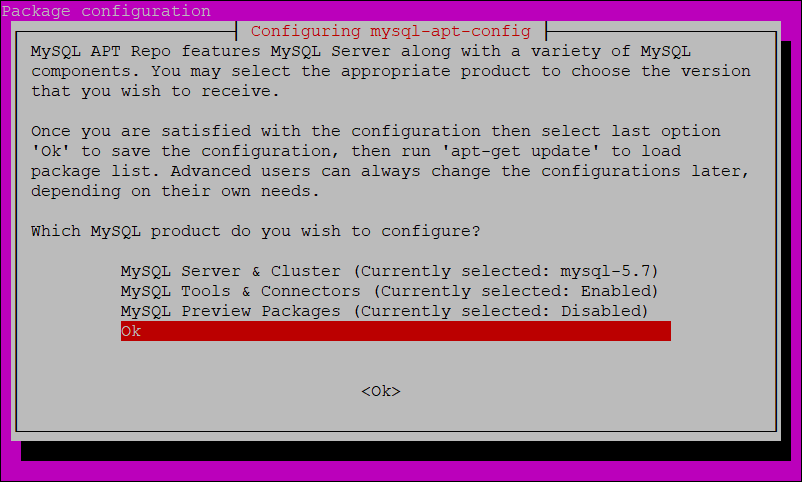
在 MySQL Server and Cluster 中选择“mysql-5.7”。

安装mysql

最终如图所示,选择 ok。

Step 2:更新 MySQL 仓库

1
2
apt-get update
apt-cache policy mysql-server

可以看到 MySQL 5.7.34-1ubuntu18.04 就在输出列表里。

1
2
3
4
5
6
7
8
9
10
11
12
mysql-server:
Installed: (none)
Candidate: 8.0.25-0ubuntu0.20.04.1
Version table:
8.0.25-0ubuntu0.20.04.1 500
500 http://cn.archive.ubuntu.com/ubuntu focal-updates/main amd64 Packages
500 http://cn.archive.ubuntu.com/ubuntu focal-security/main amd64 Packages
8.0.19-0ubuntu5 500
500 http://cn.archive.ubuntu.com/ubuntu focal/main amd64 Packages
*** 5.7.34-1ubuntu18.04 500
500 http://repo.mysql.com/apt/ubuntu bionic/mysql-5.7 amd64 Packages
100 /var/lib/dpkg/status

Step 3:安装 MySQL

1
apt install -f mysql-client=5.7* mysql-community-server=5.7* mysql-server=5.7*

安装过程中会提示设置 MySQL 的 root 密码。

MySQL 配置

首先登录 MySQL

1
mysql -u root -p

修改 mysql 库中的 user 表,运行 root 用户从任意 ip 连接。

1
2
mysql> update mysql.user set host='%' where user='root';
mysql> flush privileges;

在 MySQL 中创建 metastore 数据库

1
mysql> create database metastore;

修改/etc/mysql/mysql.conf.d/mysqld.cnf,将 bind-address 从 127.0.0.1 改成 0.0.0.0

然后重启 MySQL 服务

1
sudo systemctl restart mysql

可选:创建单独的 hiveuser 用户

1
2
3
mysql> CREATE USER 'hiveuser'@'%' IDENTIFIED BY 'hivepassword';  
mysql> GRANT all on *.* to 'hiveuser'@localhost identified by 'hivepassword';
mysql> flush privileges;

Hive 相关配置

拷贝 MySQL 驱动的 jar 包:

1
cp mysql-connector-java-5.1.37.jar $HIVE_HOME/lib

修改$HIVE_HOME/conf/hive-site.xml 如下:

1
2
3
4
5
6
7
8
9
10
11
12
13
14
15
16
17
18
19
20
21
22
23
24
25
26
27
28
29
30
31
<configuration>
  <property>
    <name>javax.jdo.option.ConnectionURL</name>
    <value>jdbc:mysql://mysqlinstance:3306/metastore?createDatabaseIfNotExist=true</value>
    <description>
      JDBC connect string for a JDBC metastore.
      To use SSL to encrypt/authenticate the connection, provide database-specific SSL flag in the connection URL.
      For example, jdbc:postgresql://myhost/db?ssl=true for postgres database.
    </description>
  </property>
  <property>
    <name>javax.jdo.option.ConnectionUserName</name>
    <value>root</value>
    <description>Username to use against metastore database</description>
  </property>
  <property>
    <name>javax.jdo.option.ConnectionPassword</name>
    <value>password</value>
    <description>password to use against metastore database</description>
  </property>
  <property>
    <name>javax.jdo.option.ConnectionDriverName</name>
    <value>com.mysql.jdbc.Driver</value>
    <description>Driver class name for a JDBC metastore</description>
  </property>
  <property>
    <name>hive.metastore.warehouse.dir</name>
    <value>/user/hive/warehouse</value>
    <description>location of default database for the warehouse</description>
  </property>
</configuration>
初始化 Hive 元数据库

1
schematool -initSchema -dbType mysql -verbose
作者

Jesse

发布于

2021-05-20

更新于

2021-07-19

许可协议

评论